
myLightPaint Pro1.1 - App Store
You'll be able to see results in few seconds.
Publisher Description
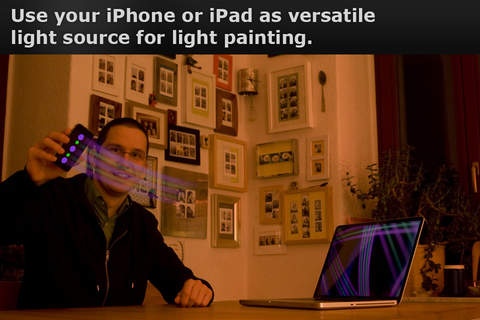
"myLightPaint Pro" turns your iPhone or iPad into the ultimate light painting tool. The PRO version comes with many light stencils and brushes. Thus, replacing many light sources for the price of a replacement bulb. Painting with light has never been more fun.
Use your webcam or high quality analog/digital camera to create fancy light paintings using your iPhone or iPad. Simply select a light stencil or brush. Wave your iPhone/iPad in any creative way in front of your camera to capture your light graffiti. Optionally adjust color, brightness, size and animation speed.
FEATURES
Easy-to-use interface
Various light stencils
Many static and animated brushes
Different color modes
Adjustable color and brightness
Adjustable speed of animations
Resize and mirror symbols
Made for iPhone and iPad
FREE WEBCAM RECORDING
We created a software to capture your light painting using your webcam and your Mac or PC: It is called myLightPainting FREE. The best thing: In contrast to traditional light painting, you can see in real-time what you are doing! Try it online or download the desktop app at www.mylightpainting.com. There is also a PRO version for additional effects at your next party.
ONLINE GALLERY
See the photos users have made at: http://www.flickr.com/groups/mylightpainting.
CONTACT
If you would like to propose additional light stencils or brushes, feel free to contact us with your idea at support@mylightpainting.com. Or just say hello!
SUMMARY
myLightPaint Pro is designed to be an intuitive, simple and versatile tool for both professional and amateur photographers or for people who just want to create fun light painting effects.
This app requires an additional webcam or a camera capable of a long exposure in order to capture the light painting.
Requires iOS 4.0 or later. Compatible with iPhone, iPad, and iPod touch.
About myLightPaint Pro
The company that develops myLightPaint Pro is AUGENZUCKER. The latest version released by its developer is 1.1.
To install myLightPaint Pro on your iOS device, just click the green Continue To App button above to start the installation process. The app is listed on our website since 2011-05-05 and was downloaded 0 times. We have already checked if the download link is safe, however for your own protection we recommend that you scan the downloaded app with your antivirus. Your antivirus may detect the myLightPaint Pro as malware if the download link is broken.
How to install myLightPaint Pro on your iOS device:
- Click on the Continue To App button on our website. This will redirect you to the App Store.
- Once the myLightPaint Pro is shown in the iTunes listing of your iOS device, you can start its download and installation. Tap on the GET button to the right of the app to start downloading it.
- If you are not logged-in the iOS appstore app, you'll be prompted for your your Apple ID and/or password.
- After myLightPaint Pro is downloaded, you'll see an INSTALL button to the right. Tap on it to start the actual installation of the iOS app.
- Once installation is finished you can tap on the OPEN button to start it. Its icon will also be added to your device home screen.
Program Details
System requirements
Download information
Pricing
Version History
version 1.1
posted on 2011-05-05
Disclaimer
Official App Store Link
We do not host myLightPaint Pro on our servers. We did not scan it for viruses, adware, spyware or other type of malware. This app is hosted by Apple and passed their terms and conditions to be listed there. We recommend caution when installing it.
The App Store link for myLightPaint Pro is provided to you by apps112.com without any warranties, representations or guarantees of any kind, so access it at your own risk.
If you have questions regarding this particular app contact the publisher directly. For questions about the functionalities of apps112.com contact us.
